
I’ve started doing CTF since last year, where I joined my schools hacking circle. I’m still very new and barely know how to do anything, but hope to steadily increase my skill. To achieve that, I’ll start writing writeups for CTF’s that I participated in and try and solve problems that I failed to during the CTF.
So this is Batman’s Kitchen CTF (what a weird name). The problems that came out weren’t all super difficult, and I managed to solve some, so that was nice. Here are a list of problems solved during the CTF.
Flag format is bkctf{...}.
Rev - supercool
Problem Statement
muchcool
Solution
This problem comes with a single ELF executable called supercool. Upon executing it it prints supercool, then seems to wait for some input, then terminates.
To start I printed the strings in this file to see if there was anything useful like Correct inside. However, I found something else.
The following is part of the strings output.
1
2
3
4
5
6
7
8
9
10
11
12
13
14
15
16
17
...
_ITM_registerTMCloneTable
PTE1
u+UH
supercool
verycool
so cool
9*3$"
bkctf{sup3rv3ryt074llyc00l}
GCC: (Ubuntu 13.3.0-6ubuntu2~24.04) 13.3.0
.shstrtab
.interp
.note.gnu.property
.note.gnu.build-id
.note.ABI-tag
.gnu.hash
...
Turns out the flag was right there. This was supposed to be an easy problem, but I didn’t expect it to be this easy.
Flag
1
bkctf{sup3rv3ryt074llyc00l}
Rev - Missing Homework
Problem Statement
I dug up this homework assignment from my “stegnography” class when that was the coolest thing on the internet. However, I lost the code I used to do it with.
Can you help me figure out what I hid in this file?
Solution
This problem comes with an apk file called hiddenfile.apk, and a python script called homework.py. The python script looks like the following.
1
2
3
4
5
6
7
8
9
10
11
12
13
14
15
16
17
18
19
20
21
22
23
24
25
26
27
28
29
30
31
32
33
import struct
import zipfile
import os
import sys
from base64 import b64encode

FLAG     = ''
APK_File = "hiddenfile.apk"

def inject_into_androidmanifest(apk_file, string_to_inject):
    # Sequentially put the base64 encoded string character by character into the AndroidManifest file
    # https://android.googlesource.com/platform/frameworks/base/+/56a2301/include/androidfw/ResourceTypes.h
    characters = list(string_to_inject)
    output_file =  "hiddenfile.apk"

    ### TODO: YOUR CODE HERE
    pass

apk_file = sys.argv[1]
string_to_inject = b64encode(FLAG.encode()).decode()
print(string_to_inject)

if not os.path.exists(apk_file):
    print(f"[!] Error: File not found: {apk_file}")
    sys.exit(1)

try:
    inject_into_androidmanifest(apk_file, string_to_inject)
except Exception as e:
    print(f"\n[!] Error: {e}")
    import traceback
    traceback.print_exc()
    sys.exit(1)
This was my first time looking at an apk file, so I struggled quite a bit.
What I eventually learned was that inside an apk file there is something called AndroidManifest.xml. A method of hiding information in an apk flie uses this xml file, by adding a list of strings to the xml. This way, the xml ignores these strings, and the apk works as normal, but the information is still there.
At least that’s how I understood it, I might be wrong.
Anyways, so what I did was I downloaded apktool on linux, and then used it to extract the AndroidManifest.xml file from the apk file. Upon opening the file, I didn’t really see much other than this line.
1
<meta-data android:name="flag" android:value="hidden"/>
So I knew something was hidden, but wasn’t sure where. It wasn’t anywhere obvious so it was time to look at the raw binary.
What I had to find was the string pool in the xml file, where the encrypted data was most likely to be. Additionally, the hidden information was likely to be stored as many strings of length one, for example hi would be stored like "h", "i".
I won’t paste the entire binary because it’s too long, but what I found was that there was a suspiciously long sequence of bytes of the format 0100 XXXX 0000 that looked like this.
1
0100 5900 0000 0100 6d00 0000 0100 7400 0000 0100 6a00 0000 0100 6400 0000 0100 4700 0000 0100 5a00 0000 0100 3700 0000 0100 6400 0000 0100 4700 0000 0100 6700 0000 0100 7a00 0000 0100 5800 0000 0100 3300 0000 0100 6300 0000 0100 7a00 0000 0100 4d00 0000 0100 5800 0000 0100 4a00 0000 0100 6b00 0000 0100 4d00 0000 0100 3300 0000 0100 4e00 0000 0100 3000 0000 0100 5800 0000 0100 3200 0000 0100 4900 0000 0100 7800 0000 0100 6200 0000 0100 6a00 0000 0100 5200 0000 0100 7900 0000 0100 6500 0000 0100 5600 0000 0100 3900 0000 0100 3400 0000 0100 6200 0000 0100 5400 0000 0100 4600 0000 0100 6600 0000 0100 5a00 0000 0100 6a00 0000 0100 4200 0000 0100 7900 0000 0100 6200 0000 0100 5400 0000 0100 5200 0000 0100 3000 0000 0100 5800 0000 0100 3200 0000 0100 7700 0000 0100 7700 0000 0100 6200 0000 0100 4700 0000 0100 7800 0000 0100 3900 0000
Again, the hidden information was likely to be split into strings of length one, and in the string pool the first number represents the length of the string, so this was promising. Reading the characters above gave the following string.
1
YmtjdGZ7dGgzX3czMXJkM3N0X2IxbjRyeV94bTFfZjBybTR0X2wwbGx9
Because of the python script, we know that this is encoded in base64. Decoding it gives the following result.
1
bkctf{th3_w31rd3st_b1n4ry_xm1_f0rm4t_l0ll}
Which is the flag.
Flag
1
bkctf{th3_w31rd3st_b1n4ry_xm1_f0rm4t_l0ll}
Misc - Speedrunning
Problem Statement
I speedran minecraft but MCSR didn’t accept my run :(
Solution
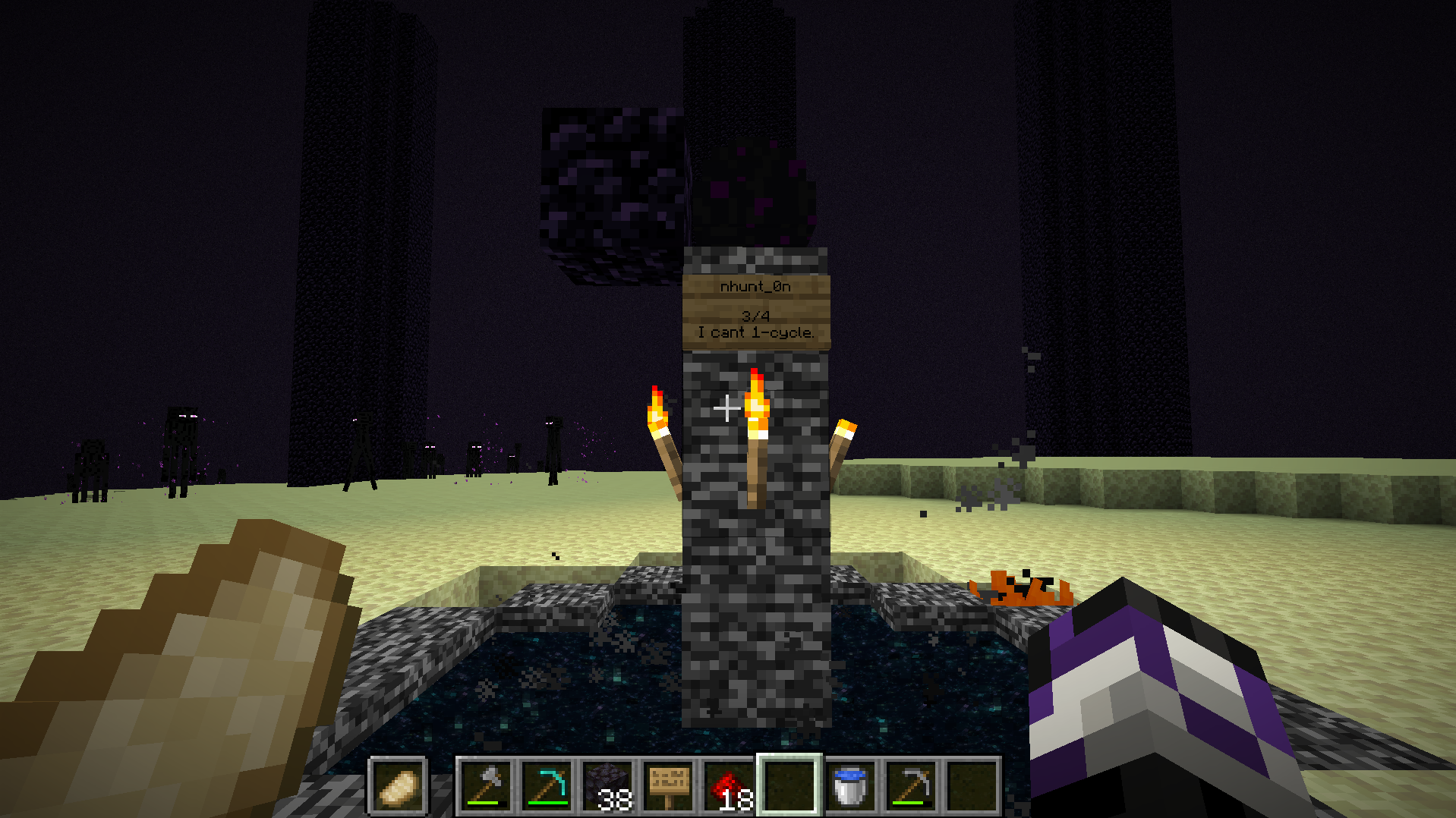
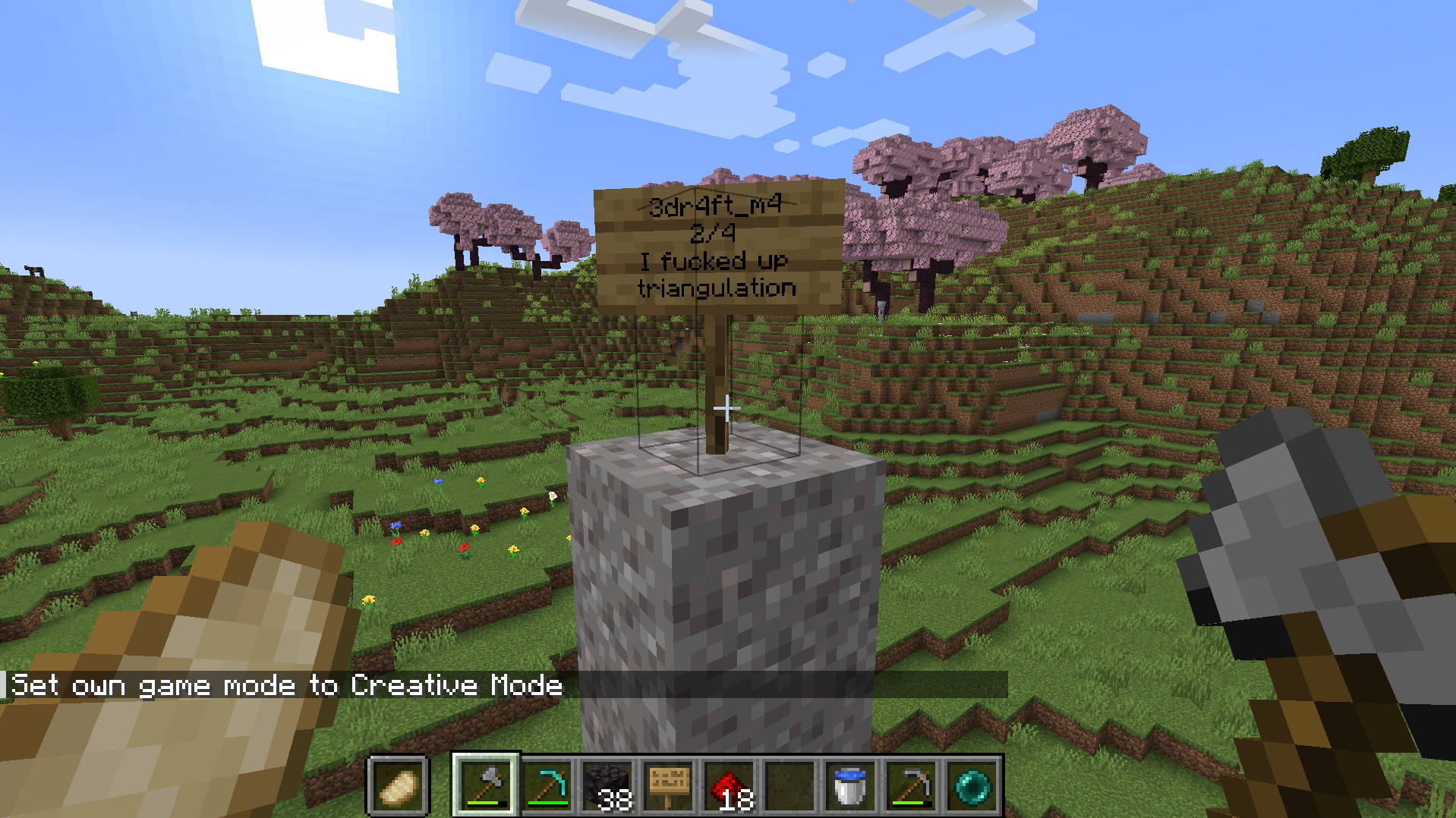
In this problem we are given 3 screenshots of some Minecraft map, and a file which upon inspection is very obviously a Minecraft map, hopefully the ones in the screenshot. The 3 screenshots look like the following.
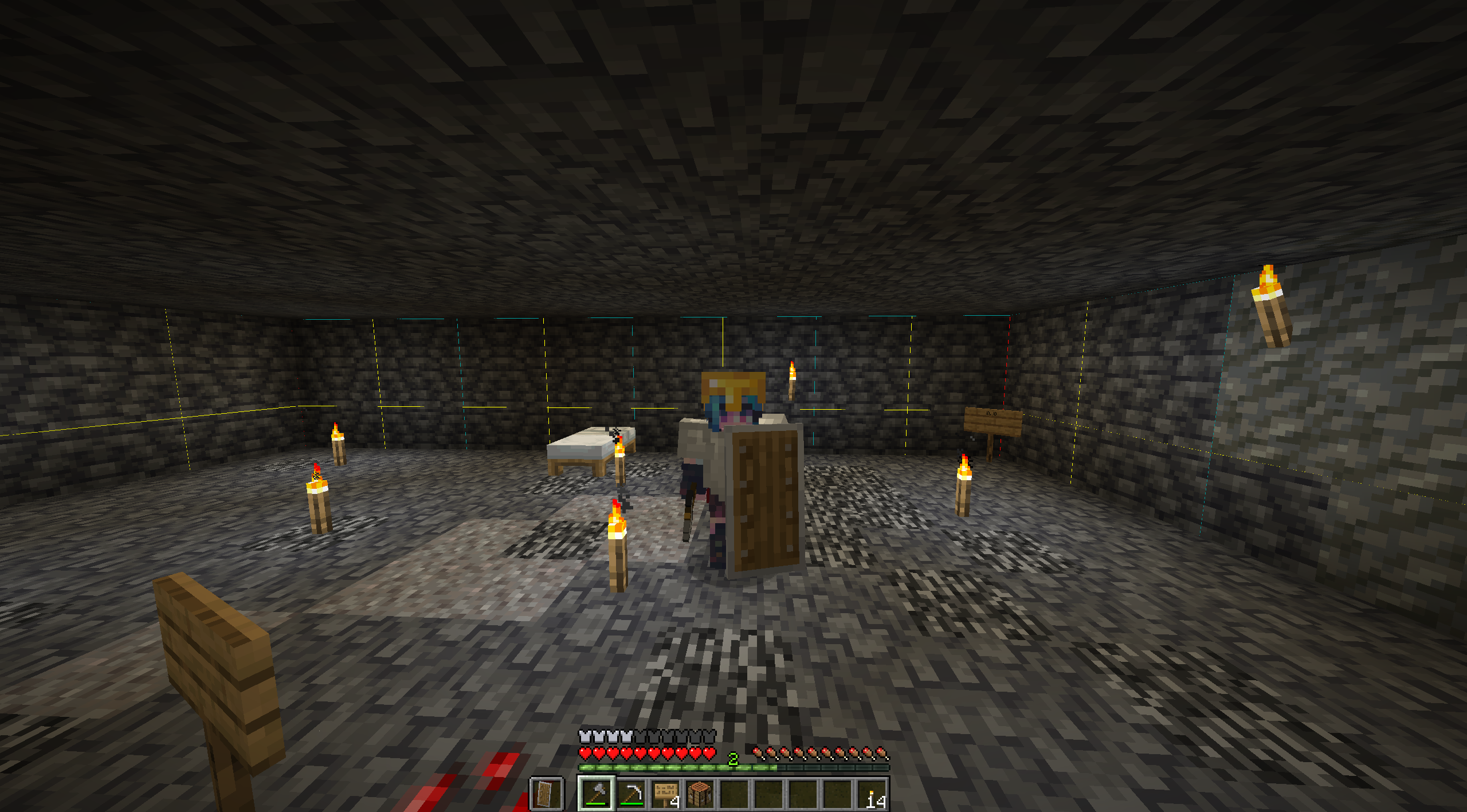
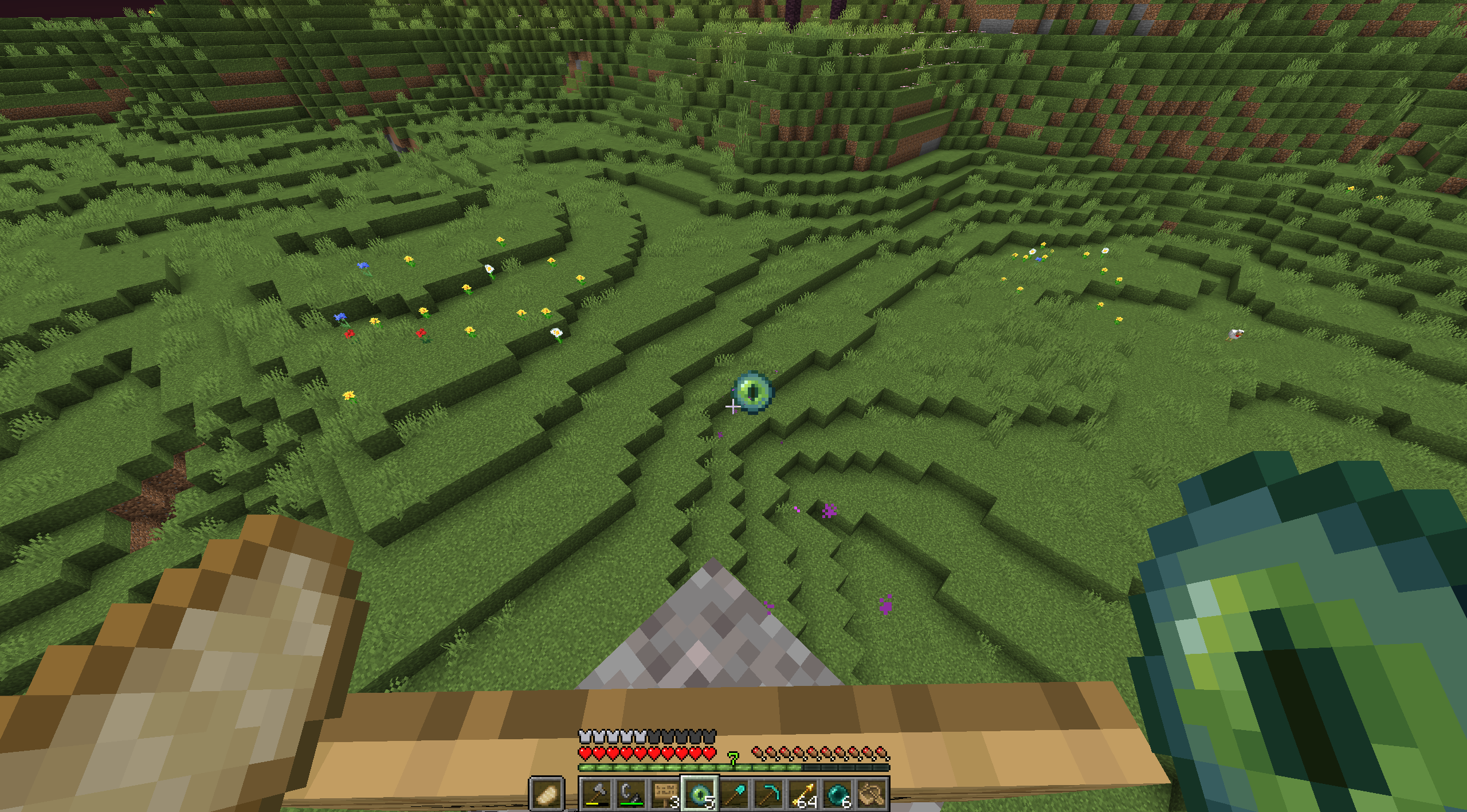
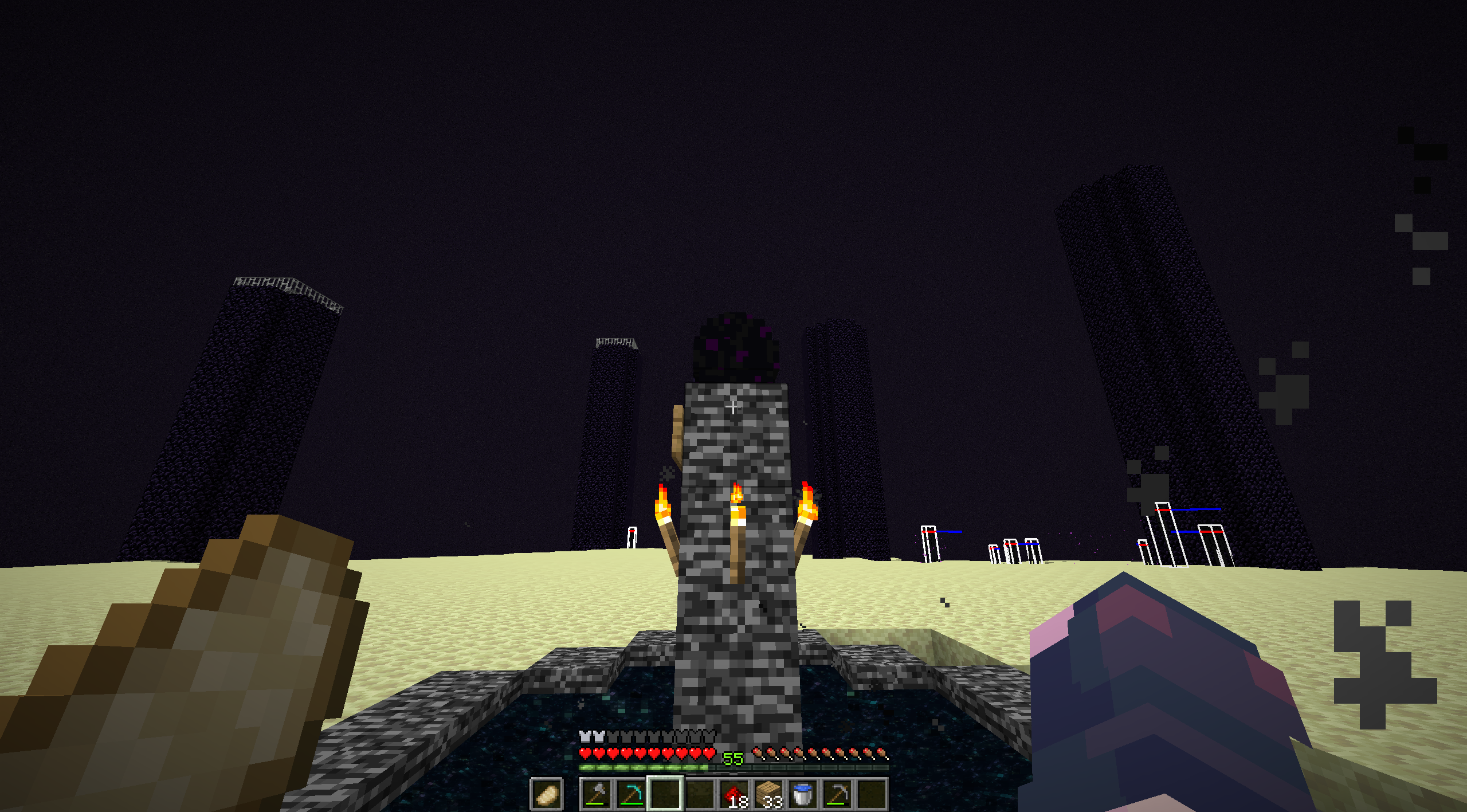
These screenshots didn’t make it immediately obvious on what to do. Still, I opened the Minecraft save given, and it was set on survival with cheats off, which I simply turned on by opening a LAN server. Anyways, this was the spawn.
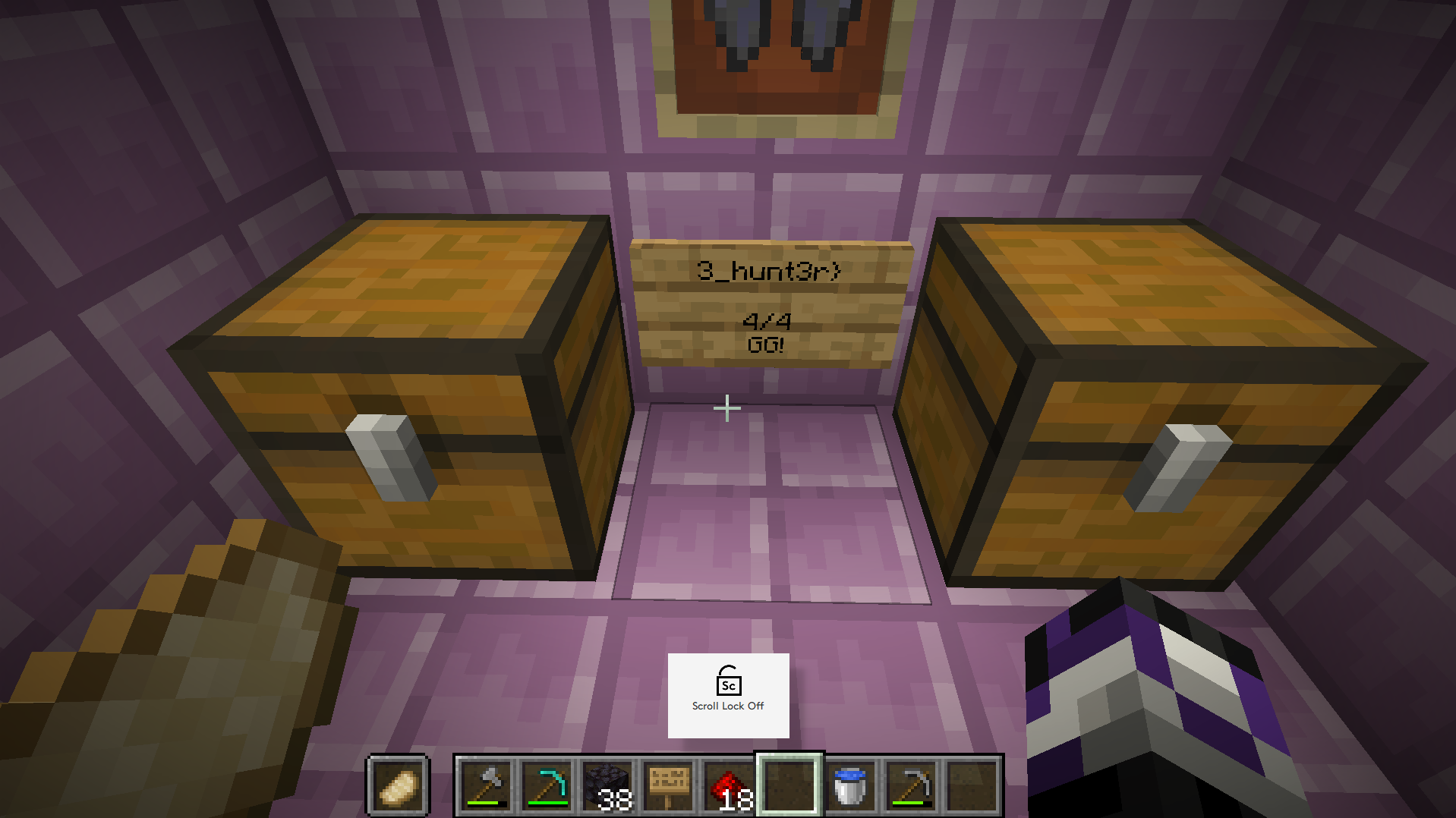
The stuff written on the sign looks suspiciously like part of the flag. So the obvious next step was to find the locations given in the screenshots. The spawn was at an end city, but the portal back to the end was nowhere near. No biggie, I just tp’d my way to the end. And just as I suspected, another sign was there.
The next screenshot given has the eye of ender going into the ground. This means that the stronghold was nearby. In fact, leaving the end and going straight up I was able to find the tower of gravel immediately. So that was easy.
The problem was the final screenshot I had to find. Almost all of the time I spent on this problem was dedicated to finding that one location.
What I first picked up on was the fact that there was bedrock in the image. This means that the y coordinate was very low, and since the location was dug out rectangularly, I initially scanned nearby areas for anything similar, with no luck.
My second try relied on the nether portal. There was one nearby the gravel tower, and I thought that if I found other nether portals in the nether, I can backtrack the location where the player started at. However, the nether was large, and while I did find another portal, it seemed like it was used for triangulation and not near the initial spawn. Also, the achievements were weird, and there was no guarantee that the player didn’t cheat their way to the end. So this was a dead end.
After some waste of time, I eventually found a program called MCA Selector, which allowed me to look at the chunks of a Minecraft world. In fact, it also had the functionality to filter chunks and show the chunks at a certain y level.
Looking at the image, it is obvious that the player existed at that chunk at some point, and there are a bunch of torched, a bed, and a sign. So I filtered out the chunks where the player existed for at least a second, and had more than 5 tile blocks. And looking at the filtered chunks, I found a suspicious one.
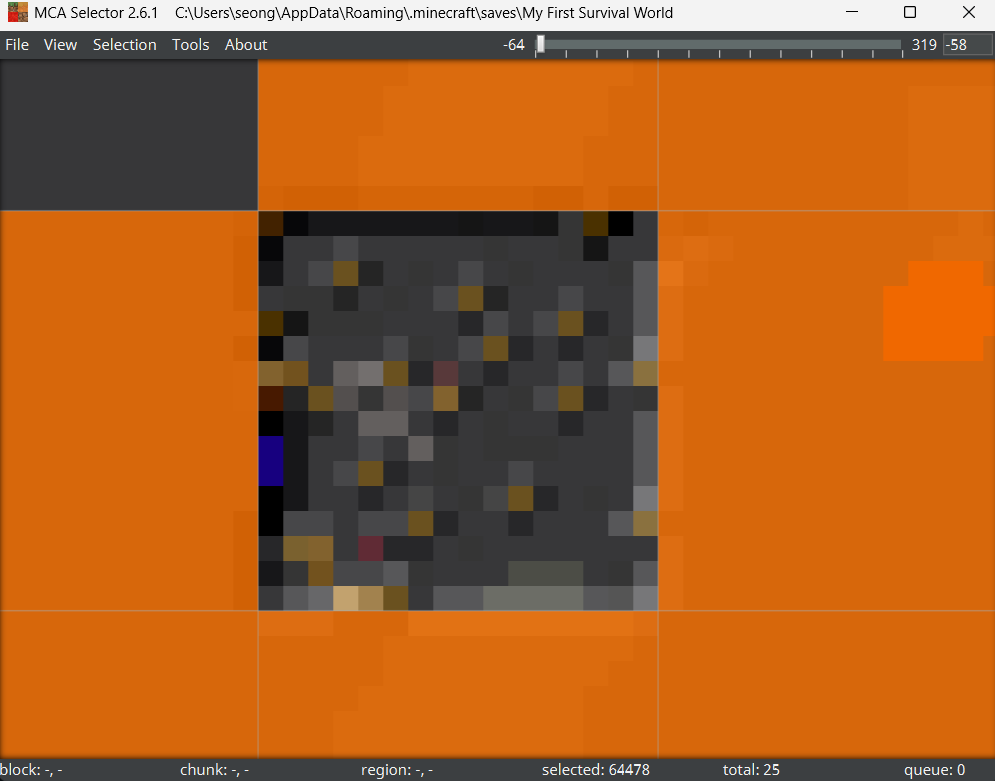
That definitely looked man-made, and going to that location, I was able to find the final part of the flag.

Putting this all together, we get our flag.
Flag
1
bkctf{m1nc3dr4ft_m4nhunt_0n3_hunt3r}
Misc - Appreciating Graphic Design
Problem Statement
Did you know you can’t make microsoft word art on a mac? I had to make them on my work computer
Solution
Okay, I really had a hard time with this one. Mostly because I just approached this problem totally wrong.
So we are given a png file called bkcfposter.png, but it won’t open. Because of this, I initially thought I had to do something to patch it and make the png work. Also, using binwalk I found that there was some sort of png inside the file surrounded by some other stuff. So I extracted that png, did a bunch of bullshit for like an hour, and ended up with nothing.
Eventually I started over, and upon inspecting the file using linux, and the result was this (ignore the renamed file).
bkcfposter_orig.png: Adobe Photoshop Image, 1080 x 1350, RGB, 3x 8-bit channels
I don’t have photoshop, but gimp should work fine. I changed the file extension to a psd file, and opened it. There were a bunch of layers, and one of them had this big white window art, that revealed text when moved around. The text was cut out of the canvas, so I increased the canvas size and revealed the flag. This was supposed to be easy, but I was just an idiot.
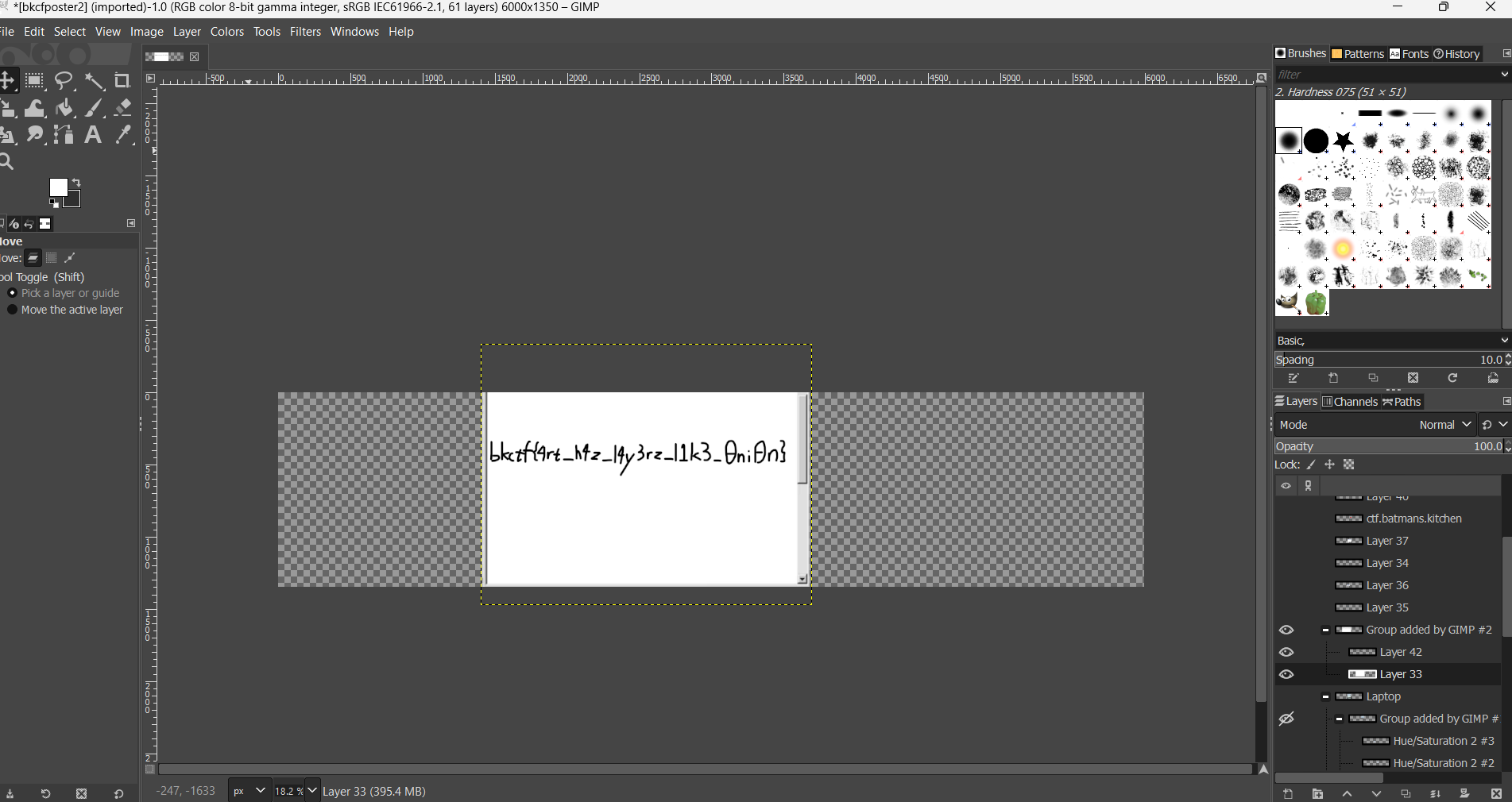
There is our flag.
Flag
1
bkctf{4rt_h4z_l4y3rz_l1k3_0ni0n}
Rev - Digger Dug
Problem Statement
My indie jrpg masterpiece about depression and wombats is now available for early access!
Solution
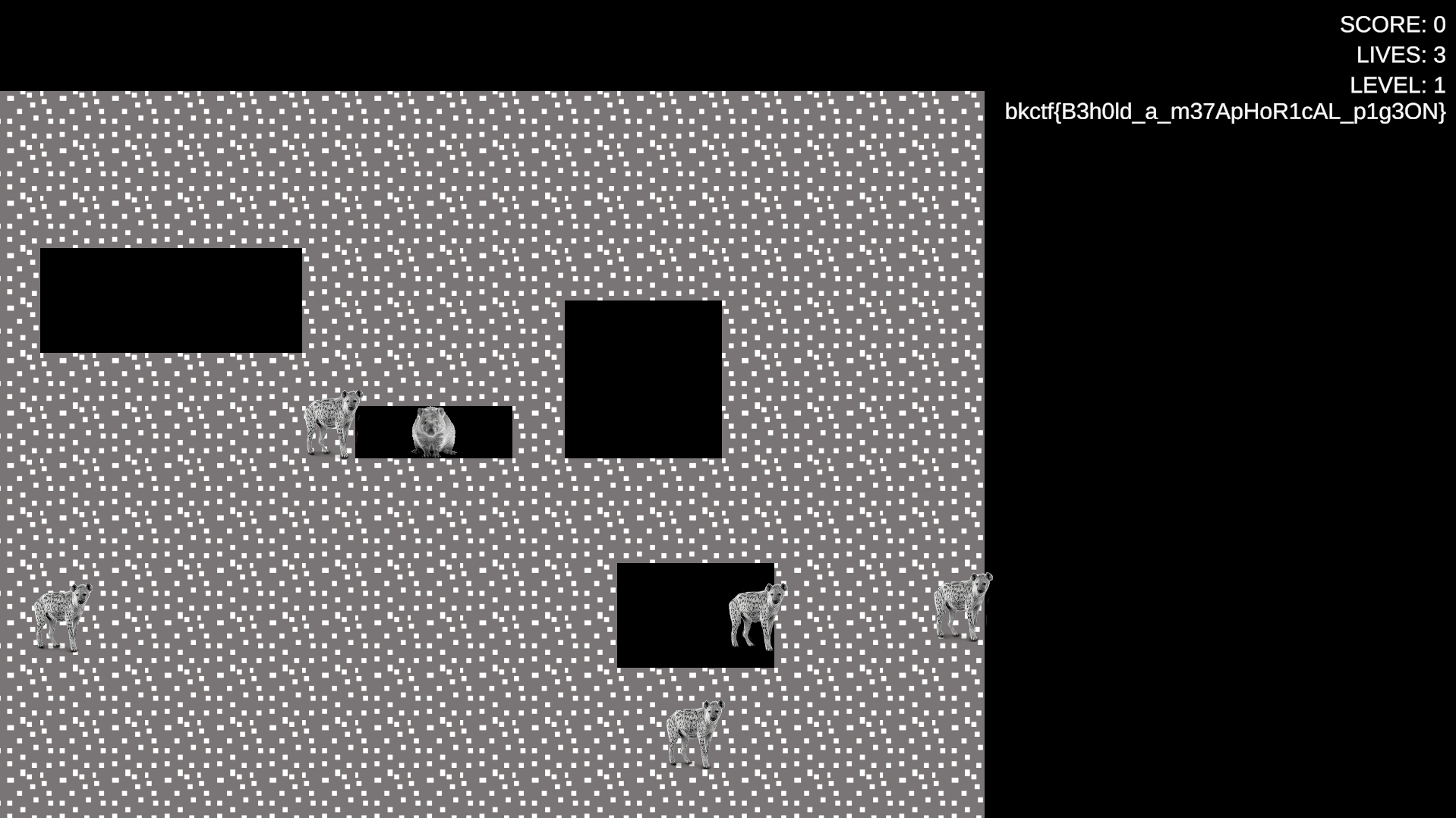
This problem comes with a Unity game file. In the game you move a hamster around, avoid wolves, and eat dirt. There isn’t much to do inside the game, and nothing much actually happens.
When it comes to Unity files, the C# scripts made are usually compiled into a file called Assembly-CSharp.dll. It is possible to decompile this by using dnspy, and that’s what I did.
Upon inspecting, we can find a very suspicious piece of code under GameUI called UpdateLevel which looks like this.
1
2
3
4
5
6
7
8
9
10
11
12
13
14
15
16
17
18
19
20
// GameUI
// Token: 0x0600001C RID: 28 RVA: 0x00002910 File Offset: 0x00000B10
public void UpdateLevel(int level)
{
	if (this.levelText != null)
	{
		this.levelText.text = string.Format("LEVEL: {0}", level);
		if (level > 9999)
		{
			TextMeshProUGUI textMeshProUGUI = this.levelText;
			textMeshProUGUI.text += "\n";
			string text = "phqgiumeaylnofdxkrcvstzwb_{}ABCDEFGHIJKLMNOPQRSTUVWXYZ0123456789";
			foreach (int index in Secrets.s)
			{
				TextMeshProUGUI textMeshProUGUI2 = this.levelText;
				textMeshProUGUI2.text += text[index].ToString();
			}
		}
	}
}
The string text looks very much like a string used to create the flag. There is no way to get past level 1 in the game though, but this can be done by simply patching the 9999 to 0.
Upon re-entering the game, we immediately get our flag.
Flag
1
bkctf{B3h0ld_a_m37ApHoR1cAL_p1g3ON}
There are a whole lot of other problems, some that were very interesting, but I didn’t have the time to solve them all. Hopefully one day I’ll become skillful enough to solve more problems during the CTF.
Anyways, that’s all from me, and my friend is telling me to quickly upload this, so cheers.